Skip to comparison
Porosi vs the wholesale software shortlist

Compare the whole order. From customer to scale to invoice.

See how Porosi connects branded ordering, Sense intake, paperless tablet picking and Porosi Bridge weighing. Compare that workflow with Fresho, Orderlion, Orderspace, QuickB2B, Choco and REKKI using current product sources and a realistic order.

TABLE SOURCE REVIEW 3 October 2026

Porosi publishes this comparison. Competitor claims are limited to the first-party material linked below.

Your ordering portal
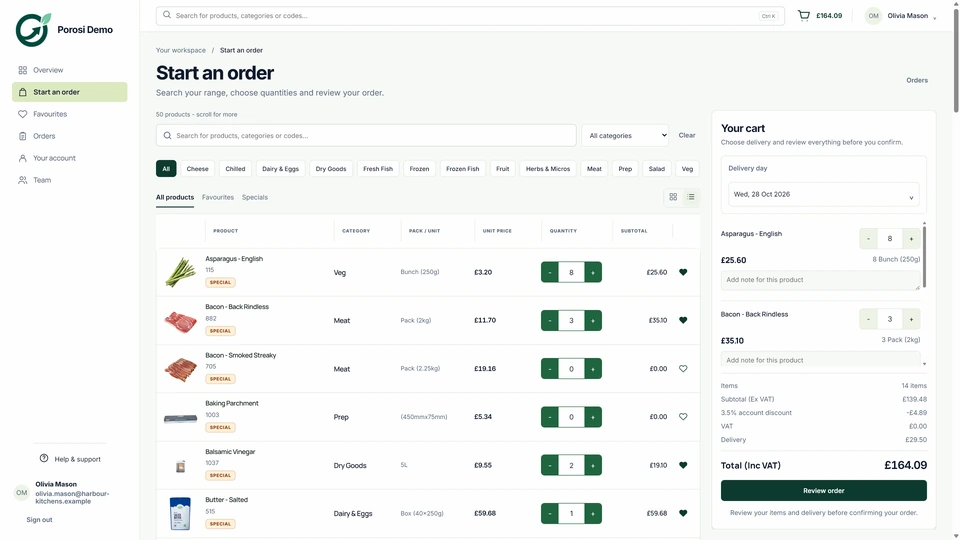
Porosi supplier-branded customer web ordering screen
YOUR APP Supplier-branded Porosi mobile ordering app product screen
POROSIYour name.
Your customers.
One order.
01Native appsiOS + Android
02Web orderingSupplier-facing
03OperationsConnected after checkout
01 The ownership test

The software should strengthen the supplier relationship—not stand in front of it.

Feature lists flatten important differences. Start with what the buyer sees, who controls the exception and whether the order stays coherent after checkout.

  1. 01
    Your customers order from your business.

    Supplier-specific web ordering plus separate iOS and Android app identities.

    BRAND
  2. 02
    Your commercial rules stay attached.

    Customer access, products, account pricing and delivery context begin together.

    CONTEXT
  3. 03
    Your staff remain in control.

    Review, substitutions, actual quantities and warehouse exceptions stay on the source order.

    CONTROL
  4. 04
    Your operation continues after checkout.

    Picking, delivery, invoicing and Xero correction remain part of the same workflow.

    CONTINUITY
02 Published capabilities. Setup questions. Workflow proof.

Build a shortlist around your operation. Then follow the same order.

These platforms cover different combinations of ordering, AI intake, operations and integrations. The questions below identify what to demonstrate and confirm with each provider. They are not scores or claims that an unlisted feature is unavailable.

01FreshoFOOD OPERATIONS
PUBLICLY DOCUMENTED

Fresho in the shortlist

Digital and printed picking, random-weight updates, delivery runs, invoices and payments.

ASK TO SEE

Demonstrate buyer branding, hardware, weight capture and invoice amendment rules.

WHY CONSIDER POROSI

Supplier-branded apps plus native tablet picking, Bridge scale capture and explicit invoice sync.

Compare with Fresho
02OrderlionORDERING + ERP
PUBLICLY DOCUMENTED

Orderlion in the shortlist

Branded app and web shop, AI Inbox, sales and driver products, and ERP integration.

ASK TO SEE

Confirm which package and connected system owns stock, picking, final weight and invoicing.

WHY CONSIDER POROSI

Keep the order, tablet station, confirmed weight and invoice action in the Porosi workflow.

Compare with Orderlion
03OrderspacePRIVATE B2B COMMERCE
PUBLICLY DOCUMENTED

Orderspace in the shortlist

Private wholesale websites, customer prices, stock, picking lists, invoices and accounting exports.

ASK TO SEE

Test your detailed fresh-food units, warehouse devices and actual-weight process.

WHY CONSIDER POROSI

Bring native customer apps and paperless scale-connected picking into the same operation.

Compare with Orderspace
04QuickB2BORDERING + PICKING
PUBLICLY DOCUMENTED

QuickB2B in the shortlist

Branded iOS and Android apps, online ordering, inventory, paperless picking and scale integration.

ASK TO SEE

Compare the supported scales, station setup, account prices and accounting handoff with your actual order.

WHY CONSIDER POROSI

Porosi Bridge supports up to four scales, native tablet stations and explicit confirmation of supplied weights.

Compare with QuickB2B
05ChocoAI INTAKE + ECOMMERCE
PUBLICLY DOCUMENTED

Choco in the shortlist

OrderAgent and branded app/web ecommerce. Its help centre describes orders flowing into the ERP for fulfilment.

ASK TO SEE

Check your exact ERP connection, available product data and which system records the final supplied weight.

WHY CONSIDER POROSI

Run a live order through Sense, a tablet picking station, Bridge weighing and the invoice review step.

Read Choco’s official workflow
06REKKIORDERAI + INTEGRATION
PUBLICLY DOCUMENTED

REKKI in the shortlist

OrderAI processes email, voicemail and document orders for ERP handoff. Its supplier API documents orders and catalogues.

ASK TO SEE

Confirm the channels, supplier-account setup and handoff into your picking, weighing and invoice systems.

WHY CONSIDER POROSI

Combine reviewed Sense intake with supplier-branded ordering, tablet picking and Bridge scale capture.

Read REKKI’s official OrderAI page
03 Like-for-like comparison

See what each platform does. And where the work happens.

Paperless picking, typed weights and a live scale connection are different capabilities. Each row below compares one specific job and links to the evidence behind the answer.

An integration means the work is handled by another connected system. Not verified means no public confirmation of the exact native workflow was found; it does not mean the capability is impossible.

Porosi, Fresho and Orderlion: exact workflow comparison reviewed 3 October 2026
Decision criterionOur platformPorosiFreshoOrderlion
01Supplier-branded web orderingYour own ordering portalYour brand, customer catalogue and account prices, connected to the Porosi order desk.Custom branding availableA branded portal with the supplier's logo, colours and customer access controls.White Label web shopA supplier-branded web shop is offered through White Label.
02Supplier-named iOS and Android appsNative apps under your nameYour own app identity on iOS and Android, connected to the same customer accounts as web ordering.Web app documentedCustom branding is offered. Its app guide describes home-screen browser access, not an App Store download.White Label add-onApps can be published under the supplier name on the App Store and Google Play. Branding is listed as an add-on.
03Customer-specific products and pricesAccount-level controlAssign products, price levels and negotiated prices to the approved customer account.Pricing and visibility groupsCustomer-specific pricing groups and control over which products each customer can view and order.Customer and group pricingProduct ranges and prices can be managed for all customers, groups or individual customers.
04Paperless picking on a tabletNative tablet pickingAn iPad or Android workspace for item status, shortages, back orders and Supply & Next Item.Yes — Digital PickingPhone and tablet picking replaces paper slips. Essentials are included with Operations; advanced controls require Premium.Fulfilment sits in the ERPNo native warehouse-picking screen verified. Its FAQ assigns fulfilment to the connected ERP.
05Live scale reading inside the picking workflowDirect through Porosi BridgeThe assigned scale sends a live reading. Staff confirm a stable weight to update the supplied line and total.No native equivalent verifiedIts public picking tour shows entered quantities. Integrated scales are described in the separate Dimension Pro partnership.Partner-system integrationBizerba BRAIN2 handles production and device data as a connected system. Native capture in Orderlion picking is not verified.
06Scale stations and tablet ownershipUp to four scales per BridgeAssign scales to stations. One tablet is active per station, with remembered selection and explicit takeover.No equivalent specification foundPicker allocation is documented in Premium. A scale-station assignment and tablet-takeover model is not specified.No native specification foundThe published partner route does not specify an Orderlion bridge, per-station tablet ownership or a scale limit.
07Recording the actual supplied weightScale capture or manual entryConfirm live kg readings, or use manual entry and per-line overrides. Retain weight history and three-decimal kg values.Weight entry is documentedThe picking tour shows manual quantity entry. Its product update supports multiple weights per line with a recorded breakdown.Final weighing not verified nativelyMultiple ordering units are documented. Final warehouse weight capture is not described as an Orderlion picking feature.
08Stock, receiving and purchasing visibilityOperational inventoryOn-hand, committed, incoming and projected stock; receiving, stocktakes, movement history and buying reports.Inventory add-onStock levels, purchase planning, stocktakes, goods received and product-unit mappings are documented.Stock controls plus ERPProduct stock can be entered manually or synced from the ERP and reduced by orders. Full warehouse processes remain ERP-owned.
09Delivery planning and documentsRuns and manifestsCustomer run defaults, daily changes, stop order and PDF/CSV manifests stay connected to the order.Runs, manifests and delivery proofDaily run changes, printable manifests and photo/GPS proof of delivery are documented.Driver ProDigital delivery notes, proof of delivery and returns/deposit tracking are listed in Driver Pro.
10Email, message and recording-based order intakeSenseSupported email, WhatsApp Business text/audio and compatible voicemail-to-email requests become drafts for staff confirmation.OrderPilotEmail, texts, WhatsApp, voicemail and PDF intake are advertised, with orders prepared for the team to approve and process.AI InboxEmail, WhatsApp, SMS and voicemail are converted into ERP-ready orders.
11Invoicing the quantities actually suppliedOrder first, invoice sync nextConfirmed weight updates the order quantity and total. Pending changes use explicit Sync Invoice, with financial-state checks.Invoices from supplied quantitiesInvoicing actual picked quantities is documented. Its Xero integration sends the invoice when the Fresho order is locked.ERP creates the finance recordThe ERP owns invoicing. Orderlion can share invoices and other documents with customers, including ERP uploads.
12Changing an existing connected Xero invoiceEligible unpaid correctionsReviewed changes can update an eligible unpaid invoice. Paid or credited records retain their financial protections.Same-invoice update not verifiedPublic sources document initial invoice sync and credit adjustments, but do not establish this exact in-place correction workflow.Depends on the ERP and connectorInvoicing is ERP-owned; the reviewed sources do not establish a native Orderlion action to rewrite that same Xero invoice.
13Credit adjustments and financial recordsOrder-linked credit notesReasoned credits remain connected to the order and configured Xero workflow, with protected financial states.Credit adjustments documentedDedicated credit lines can be added directly to orders or invoices.ERP records shared with buyersUpload credit-note documents or sync them from the ERP. Native credit-note creation is not verified in the reviewed sources.
14AI order intake included in every planYes — Sense is always includedFree to use with every Porosi plan, with no separate Porosi Sense subscription or add-on fee.OrderPilot is an add-onFresho presents OrderPilot as an additional product; an all-plan, no-extra-cost inclusion is not stated.Plan-dependent inclusionEnterprise lists Inbox XS as included. Orderlion Inbox is also offered as an add-on.
15Customer buying insights and follow-upInsights is always includedInvestigate changes in buying, product demand, margins and stock signals. Free to use with every Porosi plan.Paid Messaging & InsightsCustomer behaviour and at-risk-account insights are offered in the paid Messaging & Insights product.Analytics and Sales ProCustomer/product performance, order patterns and at-risk accounts are documented. All-plan free inclusion is not specified.

Showing all 15 comparison criteria.

Porosi Bridge hardware and optional tablets are quoted for your setup. Sense and Insights are free to use and always included with every Porosi plan. A partner system's capabilities are not counted as features built into the ordering platform.

04 Porosi compared with Fresho

Compare fresh-food operations. Include the picking station.

Fresho has a documented digital-picking product with phone and tablet workflows. Its public tour shows quantity entry, shortages and picker allocation. Porosi's distinction is the direct Bridge connection: an assigned scale reading feeds into the native tablet workflow and becomes supplied weight after staff confirmation.

THE DECISION

In Porosi, follow the reading from your assigned scale to Supply & Next Item, the order total and the explicit invoice sync. Digital picking on its own does not establish that same scale-connected workflow.

  • 01Your supplier identity in the app stores
  • 02The same customer account across app and web
  • 03Paperless tablet picking and connected Porosi Bridge scales
SUPPLIER APP IDENTITYiOS + ANDROID
Porosi supplier-branded mobile ordering application
VISIBLE TO THE BUYERYour nameYour iconYour coloursYour catalogue
Explore white-label apps
05 Porosi compared with Orderlion

Orderlion also offers white-label. Compare where each workflow runs.

Orderlion documents a branded app and web shop, AI Inbox, Sales Pro, Driver Pro and an ERP-centred setup. Porosi connects the customer order to its own stock, tablet picking, Bridge weighing and invoice workflow. Map which system your team will use at each step.

POROSIYour customer-facing identity
  1. 01
    CUSTOMERBranded app & web

    Account catalogue and pricing

  2. 02
    ORDER DESKReview & amend

    Exceptions stay on the source order

  3. 03
    WAREHOUSEPick & weigh

    Tablet stations and Porosi Bridge

  4. 04
    DELIVERYPlan & hand off

    Progress follows fulfilment

  5. 05
    FINANCEReview & sync

    Explicit eligible invoice updates

Include the channels customers already use

Orderlion documents AI Inbox. Porosi Sense connects supported email and WhatsApp intake and compatible voicemail-to-email recordings to drafts for staff confirmation. Sense and Insights are included in every Porosi plan at no extra cost. Explore Sense.

06 A worked quantity and invoice example

Confirm the supplied weight. Then review the invoice change.

Illustrative example: a kilogram-priced line has an account price of £18 per kg. Confirming 2.38 kg changes the order line from £36.00 to £42.84. Porosi shows pending invoice changes and an explicit Sync Invoice action. Eligible unpaid invoices can be updated; paid or credited records retain their financial protections.

POROSI ORDER#PDSHOW-2607-014
CUSTOMERExample trade customerIllustrative order, not a customer result
PRODUCTSalmon side — freshActual-weight item
Quantity
2.00 kg
Line total
£36.00
CONNECTED XERO INVOICECurrent
XInvoice INV-10428
Source order
#PDSHOW-2607-014
Invoice line
£36.00
Next action
No change waiting

The invoice matches the current Porosi order.

01Confirm the actual weight

At a picking station, Supply & Next Item applies the stable reading to the order quantity and total.

02Review pending invoice changes

Scale confirmation updates the order. It does not silently bypass the separate invoice sync action.

03Sync with financial controls

Review the explicit Sync Invoice action. Later adjustments to protected invoices use the appropriate credit-note workflow.

07 Methodology & disclosure

Read the sources. Then test one real order.

This is Porosi’s comparison, not an independent ranking. The Fresho and Orderlion table was reviewed on 3 October 2026 against product pages, pricing, help and integration documentation, including Fresho’s 15-step public picking tour. The wider shortlist was reviewed on 2 October 2026. “Not verified” refers to the exact native workflow in that row; it does not prove a private or newly released capability is unavailable. We distinguish current public evidence from gated guides and do not treat a partner integration as a native feature.

FRESHO / DIGITAL PICKINGEssential and Premium picking, with a public workflow tourRead source ↗ FRESHO / SCALE PARTNERDimension Pro partnership and integrated Avery Berkel scalesRead source ↗ FRESHO / PRODUCT UPDATEMultiple weights, credit lines, stocktakes and goods receivedRead source ↗ FRESHO / BRANDINGCustom-branded customer orderingRead source ↗ FRESHO / APP FORMATPublished browser-app guidanceRead source ↗ FRESHO / INVENTORYStock, purchases and unit mappingsRead source ↗ FRESHO / INSIGHTSPaid customer insights and messagingRead source ↗ ORDERLION / SCALE PARTNERBRAIN2 is a connected production systemRead source ↗ ORDERLION / STOCKManual stock entry and ERP synchronisationRead source ↗ ORDERLION / DOCUMENTSSharing invoices and credit notes, including ERP uploadsRead source ↗ QUICKB2B / OPERATIONSBranded apps, online ordering and scale pickingOpen source ↗ CHOCO / ECOMMERCEBranded app, web storefront and ERP fulfilmentOpen source ↗ CHOCO / PLATFORMOrderAgent, ecommerce and sales toolsOpen source ↗ REKKI / ORDERAIDocument, email and voicemail order processingOpen source ↗ REKKI / SUPPLIER APIOrder, catalogue and customer integration scopeOpen source ↗ POROSI / BRIDGEConnected scales and native tablet pickingSee the workflow ↗ POROSI / CAPABILITIESCurrent paperless picking and invoice controlsRead the details ↗ FRESHO / PRODUCTOnline ordering and operations overviewOpen source ↗ FRESHO / CUSTOMER LAUNCHBrowser ordering from any deviceOpen source ↗ FRESHO / XEROInvoice flow and lock-period wordingOpen source ↗ ORDERLION / WHITE LABELBranded app and web shopOpen source ↗ ORDERLION / PACKAGINGProducts, add-ons and integrationsOpen source ↗ ORDERLION / FEATURESAI Inbox, Sales Pro and Driver ProOpen source ↗ ORDERSPACE / PRODUCTPrivate B2B ecommerce for small businessesOpen source ↗ QUICKB2B / PRODUCTPhone app ordering for Xero-connected wholesalersOpen source ↗
THE ONLY COMPARISON THAT COUNTS

Put the same customer order through each shortlist.

Bring one account, its real prices, one delivery change and the finance result your team needs. Porosi will show the complete path.

Book your comparison walkthroughOr call +44 07927 994619