
Customer ordering
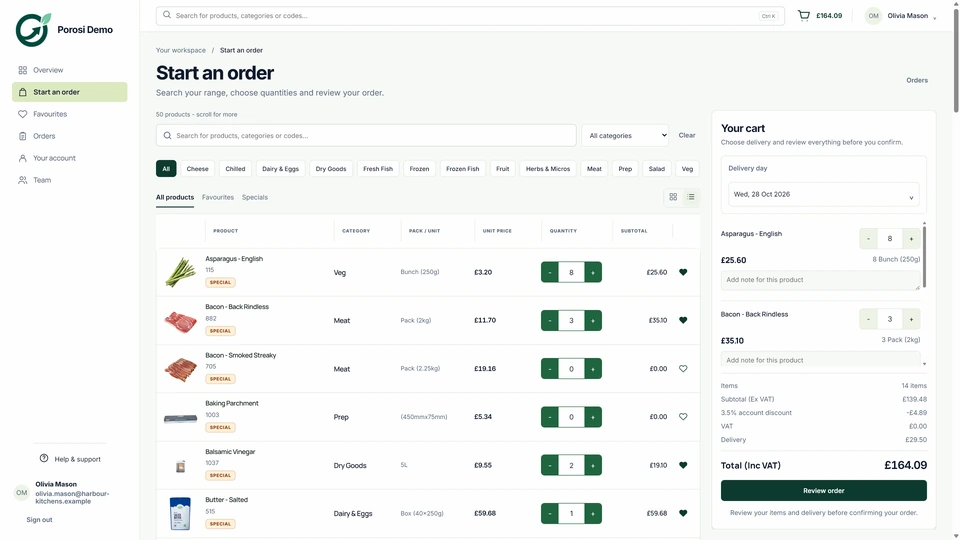
Check how buyers sign in, find their products and prices, repeat a basket and choose a delivery date.
FoodStorm focuses on grocery counters and prepared-food ordering. Porosi serves wholesale suppliers managing trade customer orders. Start by checking which product matches the customers and orders your business handles.
Comparison disclosure: Porosi publishes this page. Linked official product sources were checked on 12 July 2026; confirm current packaging directly with each provider.

Prepared food scope named
Trade order tested
Production boundary checked
Staff review followed
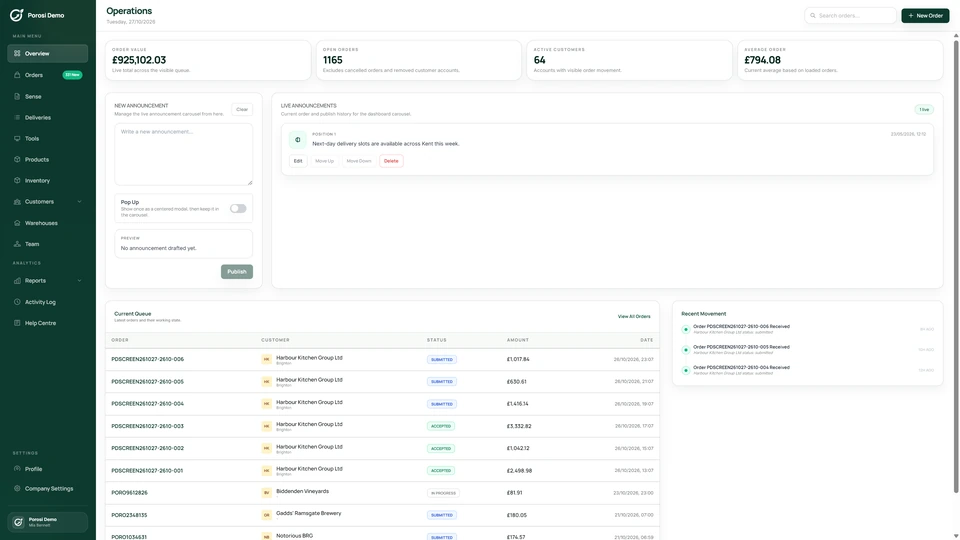
Real Porosi product screens. Customers can order on iOS, Android or the web, and submitted orders appear in the supplier dashboard for review.
FoodStorm is positioned around grocery perimeter counters, prepared foods, order ahead, catering, order production, pickup, omnichannel ordering and POS-connected operations. Porosi is the stronger first demo when the supplier needs known trade customers to submit cleaner orders before production, fulfilment or finance teams act on them.
Check how buyers sign in, find their products and prices, repeat a basket and choose a delivery date.
Check how app, web and manual orders reach staff, and how the team handles an unclear product or quantity.
Confirm the devices, scales, order documents and accounting connections your business needs.
Compare the included features, setup work, support and separate charges in each quote.
A buyer builds the order from the products, prices and history available to their account. When they press submit, order ahead, prepared foods, catering orders and production workflows stay with the order, so the supplier can check it without retyping a call, email or message.
The supplier team receives one order record with order ahead, prepared foods, catering orders and production workflows. Staff can check exceptions before picking, delivery or invoice preparation begins.
Grocery perimeter OMS, catering, order-ahead, production tools, pickup management, kitchen display systems, CRM, reports and POS integrations.
Supplier-owned app and web ordering for known trade customers, with staff review before picking, delivery or invoicing.
Confirm the app, web and branding options included in the selected package.
Supplier-branded iOS, Android and web ordering use the customer's approved trade account.
Ask how staff handle substitutions, quantity changes and invoice corrections.
Staff review eligible orders and use the supported invoice-update or credit action for financial changes.
Porosi publishes this comparison and has a commercial interest in the decision. We have separated public competitor positioning from Porosi's own product claims, linked the primary pages we reviewed and avoided invented scores, customer counts or savings.
List your regular order types and the tasks that take the most staff time. Ask each provider to explain those examples and the setup required.
Use familiar products, pack sizes, account prices and delivery details.
Ask about a shortage, substitution or invoice change your team deals with regularly.
Confirm the selected features, devices, accounting connections and support arrangements.
FoodStorm is positioned around grocery perimeter counters, prepared foods, order ahead, catering, order production, pickup, omnichannel ordering and POS-connected operations. Porosi is the stronger first demo when the supplier needs known trade customers to submit cleaner orders before production, fulfilment or finance teams act on them.
Orders with products, prices, notes and delivery details already attached. A dashboard review step for changes, exceptions and invoice-ready detail.
Porosi checked the linked official product sources on 12 July 2026. Porosi publishes this comparison, so confirm current packaging, hardware and integration requirements directly with each provider.
Use a current customer account, usual products, account-specific prices and one awkward order sample to show Porosi against your real ordering day.