
Open your branded app
Customers recognise your business name, logo and colours when they open the app.
Give customers a branded iOS or Android app and a web portal with their products, agreed prices, favourites and order history. Your team receives submitted orders in the supplier dashboard.


Open your branded app
Sign in to a trade account
Build the next order
Send it to your team
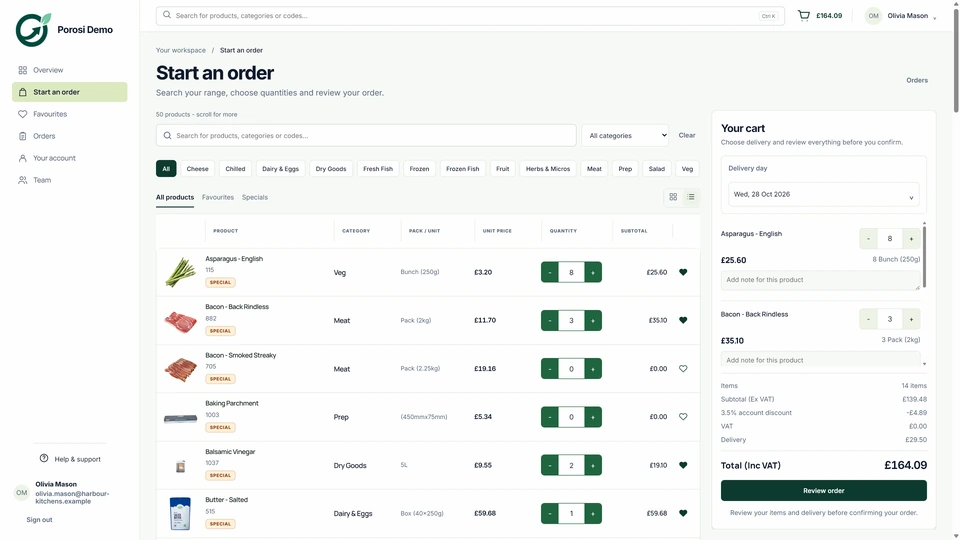
Real Porosi product screens. Customers can order on iOS, Android or the web, and submitted orders appear in the supplier dashboard for review.
Your customers open an app carrying your name and branding. They sign in to their trade account, choose products at their agreed prices and send the order straight to your supplier dashboard.
Customers recognise your business name, logo and colours when they open the app.
The account determines which products and prices the buyer sees.
Start with favourites or a previous order, change quantities and add delivery notes.
The submitted order appears in the dashboard for staff to review and fulfil.
Check these details with the people who handle the orders each day.
The buyer is linked to the correct customer account.
Approve the account and invite the people who can place orders.
Pack descriptions and selling units are clear.
Maintain the products and prices shown to that account.
The submitted basket has the expected items and delivery date.
Review the order with the customer before inviting more buyers.
Start with your existing customer accounts and product information. Check the settings with the people who handle these orders each day.
Check product names, units, images and customer prices.
Provide your business name, logo and app-branding details.
Help a small group sign in, place an order and find their history.
Yes. The web ordering portal works in a browser on a computer, tablet or phone.
Yes. Product access and prices follow the approved trade account.
Yes. They can start from a previous basket, adjust products and quantities, and submit it as a new order.
Tell us how you handle these orders today. We will show the relevant screens and answer your setup questions.