
Choose the customer
Confirm the trade account before adding products.
Help a customer build an order using their account products and prices. Keep quantities, notes and delivery details available for the order desk to review.


Choose the customer
Build the basket
Record the details
Review the order
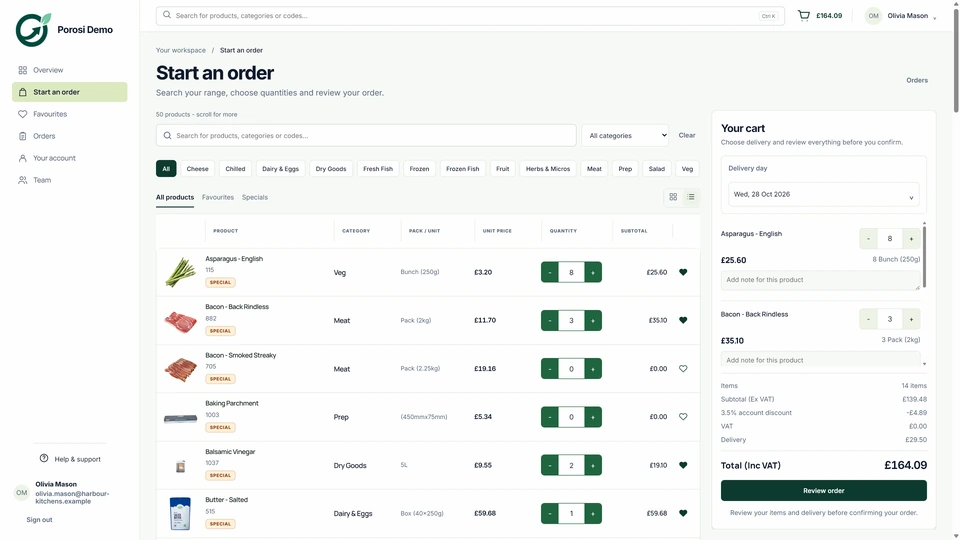
Real Porosi product screens. Customers can order on iOS, Android or the web, and submitted orders appear in the supplier dashboard for review.
Staff can help a customer place an order while keeping the correct products, prices, quantities and delivery notes together. The order can then be reviewed in the supplier dashboard.
Confirm the trade account before adding products.
Use the products and prices appropriate to that customer.
Check quantities, delivery date and any instructions from the buyer.
Make sure the order desk can see and process the captured order.
Check these details with the people who handle the orders each day.
The customer may have more than one buyer or location.
Confirm the account before selecting products.
The customer needs their agreed price.
Review account pricing while building the order.
A visit may have limited internet access.
Confirm the device and connection requirements; this page does not promise offline synchronisation.
Start with your existing customer accounts and product information. Check the settings with the people who handle these orders each day.
Give the team the appropriate ordering permissions.
Review account products, prices and delivery information.
Walk through a typical assisted order and the office review that follows.
Yes. Staff-assisted ordering keeps the customer account, products, prices and notes with the captured order.
This page describes customer order capture and review. It does not promise a separate CRM or sales pipeline system.
No. Check the supported device and connection requirements for your team before relying on it during visits.
Tell us how you handle these orders today. We will show the relevant screens and answer your setup questions.